No. of Recommendations: 18
To possibly take this feature another step further in a future release, the board could fetch the target page's title, and insert it into the post (next to the link), or perhaps as link hover text...Also an excellent idea, and done, though in special way.
I avoided it for 3 years because Shrewd'm authors like to have their articles kept as close in text form as possible - and this is partly because the tradition/culture here, but also as it is suitable for external publication in article format, such as the Shrewd'm Weekly, and I'll increasingly increase (those two word intended) the exposure of your articles to outside audiences.
So unmodified pure-text (article-centric) layout wil become even more important.
However I found a way to make the links active with more info in a tasteful way.
The link's position is completely unchanged, so it can flow freely in the middle of a paragraph.
But the text itself changes to show the description of teh link - no changing from one line to two lines, etc - just the link alone changes.
( Nerdy part: The description is looked up by a combination of decoding the url itself (as that is often more useful information than the page title, which is often designed to firstly attract attention clicking in Google search etc, so I avoid the page title), and only when a useful description can't be constructed from the 'permalink' url itself, it then uses the page title and descriptions as a last resort, and caches the results so there is only one url-lookup per link - to keep Shrewd'm performance super-fast. )
As the links show a description and not the ur nowl, I made the label that appears when hovering to show the full url so peopel can still know the full url.
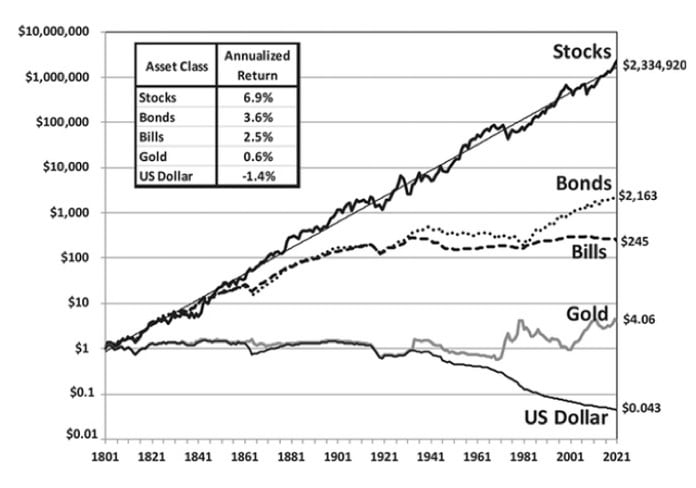
Finally, if hovering over any image, then it previews the image. So if you Ctrl-click or right-click over any image on the internet and copy-paste into Shrewd'm the url ending in .jpg or .png etc, such as this one:
https://www.crews.bank/hubfs/Stocks%20for%20the%20... - Notice the image is in the niddle of the text - so Shrewd'm remains article focussed.
Hovering over the image link above shows the image. If you have an image you want to show, find it on the internet (or if you want to upload an image, there are a lot of sites that allow image uploading) and then copy the url of the image, and paste it in Shrewd'm - the image will render when hovering over the link
without interrupting the pure text-oriented layout that Shrewd'm authors love here.
- Manlobbi